
A classic multimedia player for Windows
Windows Media Player is one of the most popular multimedia players in the world. As the default choice for Windows PCs, this software lets you play music and videos without any issues. WMP comes as a built-in media player with every version of the Windows operating system. Over the years, regular updates have introduced new features, making the tool more powerful than iTunes for Windows, VLC, and other similar apps. With the familiar interface, you can start using this multimedia player from the get-go.
Top Recommended Alternative

Plenty of features with a familiar interface
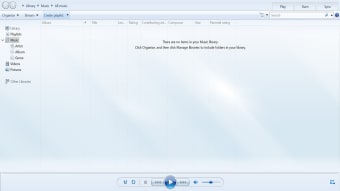
Since 1991, Windows Media Player has been bundled with Microsoft Windows computers. With no complicated setup, the program also boasts a wide range of features. The tree-style layout of file directories lets you conveniently explore multiple folders in your system. There’s also a search box, so you can directly input the name of a song, artist, or other information to look for your favorite content.
While WMP aimed to become as powerful as iTunes for Mac, the lack of codecs has become a shortfall. However, the latest version of the program supports multiple file formats, codecs, and other functionalities. As such, you don’t need to look elsewhere for playing music, videos, images, or other multimedia content.
With Windows Media Player download, you get support for various file extensions, including MKV and MP4. Whether you choose a smartphone or an external device for the file source, you won’t experience any issues with compatibility and playback.
What are the features?
As mentioned earlier, WMP comes with many features, so you can enjoy multimedia content on Windows 7, Windows 8, Windows 10, Mac, Android, and other platforms. There’s a ‘Create a Playlist’ feature, which lets you create customized video or music playlists. With this function, you can use the drag-and-drop interface to simply add files from the system, external hard drive, or other sources like iTunes. Since the tool supports a five-star rating system, you can easily organize all the files.
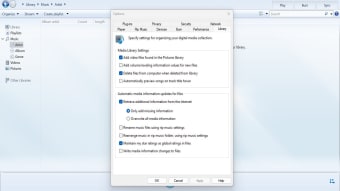
Windows Media Player comes with many of the classic features available in different versions over the years. For instance, the app still has a CD burner, which makes it easier to create perfect mixes. You just have to drag and drop files into a ‘Burn List’ to start burning CDs. With WMP, you can even choose the preferred audio file type, bitrate, and other parameters before ripping music.
How’s the interface?
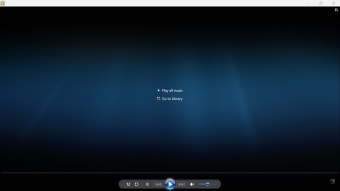
A good number of multimedia players have launched in the market. So, to keep up with changing times, Microsoft brought some major changes to Windows Media Player. For instance, while the program retains the classic familiar interface, it offers additional, new themes. You can choose from a Blue UI, a professional Black Fascia theme, and other options according to your preference.
The toolbar has large-sized familiar icons for Sync, Burn, Rip, Library, and Now Playing. Before, you used the ‘Guide’ button to seek help or go through tutorials. Now, there is the replacement ‘Music Services’ button. It lets you configure preferred online music services to be accessed from within the media player.
Also, WMP has made some subtle changes to the ‘Media Library’. Instead of a monotonous database-like textual representation of files, the program focuses on graphical albums. It’s visually more appealing and lets you browse through different categories with ease.
What are the limitations?
While Windows Media Player comes with some excellent features, it also has a few limitations. For instance, whether you have a small media collection or a comprehensive library, the program displays incorrect or missing metadata. Moreover, it doesn’t support live streaming, making it a possible deterrent for some users.
Some prominent features are still missing as well. There’s no podcast capability, which is already present in iTunes for Windows. Most importantly, Windows Media Player doesn’t have a good music store, which can make it difficult to download new songs.
Having said that, if you’re looking for a familiar interface to play songs offline, Windows Media Player is still a good choice. Since it’s the default multimedia player for Microsoft PCs, it receives regular updates.
What are the alternatives?
Considering the limitations of the program, you might want to consider a few alternatives. VLC Media Player, one of the leading competitors of WMP, is a great choice. It comes with a simple interface and supports a wide range of file formats. Moreover, it lets you stream content from Disney+, Xbox, Playstation, Hulu, and other services.
KMPlayer, which supports High-Definition, 4K, and other video formats is another good choice for Windows PCs. It lets you enjoy music and movies with powerful features, including subtitles, VR settings, audio syncing, and more.
You could also try PotPlayer, which is an easy-to-use program. It can import files from multiple sources, including DVDs, TVs, URLs, and FTP servers. With PotPlayer, you can play subtitles and customize the on-screen text for better visibility.
The last, few years have seen Microsoft transform the classic Windows Media Player into a powerful platform for playing music and videos. The familiar interface, support for multiple file formats, and graphical representation of files are some amazing reasons to try out the program.
Also, Windows Media Player receives regular updates from the development team. As such, you can expect new features and functionalities on a regular basis. If you’re looking for a simple, to-the-point, and functional player, Windows Media Player download is a good choice.
An ideal choice for Windows PCs
Without a doubt, Windows Media Player has brought some good improvements to the program. It has tried to keep up with the evolving demands of users. However, the tool still receives some tough competition from the likes of VLC, iTunes, KMPlayer, etc. Despite this, it is worth the download.